
See how your team uses AI, without reading their prompts
You probably have an AI policy. A document on the shared drive that lays out which tools are allowed and which data doesn’t belong in a chatbot. The trouble is that a document stops nothing the moment things go wrong. Your employee’s browser has never read it. Someone opens ChatGPT, pastes a customer list, gets their summary back, and you hear nothing about it.
A policy on paper also won’t tell you what’s happening live. Which AI tools do your people reach for every day? And what data leaves their prompts? Almost every organization is missing that view, and you can’t steer something you can’t see.
This article is about getting that view back. Not by reading along with your colleagues, but by showing what actually happens. With real screens from the dashboard.
How much visibility do you have into AI use right now?
Probably not much. In 2024, Software AG surveyed more than 6,000 knowledge workers. Three quarters use AI tools. Nearly half keep doing so even when their employer bans it. That unsanctioned use is called shadow AI, and by definition it happens out of IT’s sight.
You can see it at the regulator too. The Dutch data protection authority received dozens of breach reports in 2024 and 2025 where employees had pasted personal data into an AI chatbot. So this isn’t a future scenario. It’s already going wrong, without you noticing.
Let your team use AI. Without the data leaks.
Redactprompt strips national IDs, IBANs and customer data from the prompt locally, and gives you central policy and visibility per chatbot. Free to start, no credit card.
Why a survey or network monitoring falls short
The usual advice is an anonymous survey plus monitoring your network traffic. Both help a little, but they answer the wrong question.
A survey tells you what people say they do, and it’s a snapshot at best. Network monitoring sees traffic heading to OpenAI or Anthropic, but not what was sent or whether it was sensitive.
And that’s exactly what you want to know. Which kind of data could have leaked, and on which tool? Preferably without reading the prompts themselves, because then you’re spying on your people and building your own pile of personal data.
Visibility without surveillance
The starting point is simple. You protect your employees, you don’t spy on them. A good picture is aggregate. How many prompts were scanned, how many held sensitive data, which kinds, and on which chatbots. What you don’t want to see, and shouldn’t store, is the content of the prompts.
That fits the GDPR too. You honor data minimization by keeping only metadata, not the typed text. Redactprompt works this way. Detection runs locally in the browser and the dashboard only ever sees counts, never prompt content.
What visibility into AI use looks like
Below is the dashboard with example data. In one glance you can read off how many prompts were scanned, how many held sensitive data, how many unapproved chatbots were blocked, and how many people use the extension.
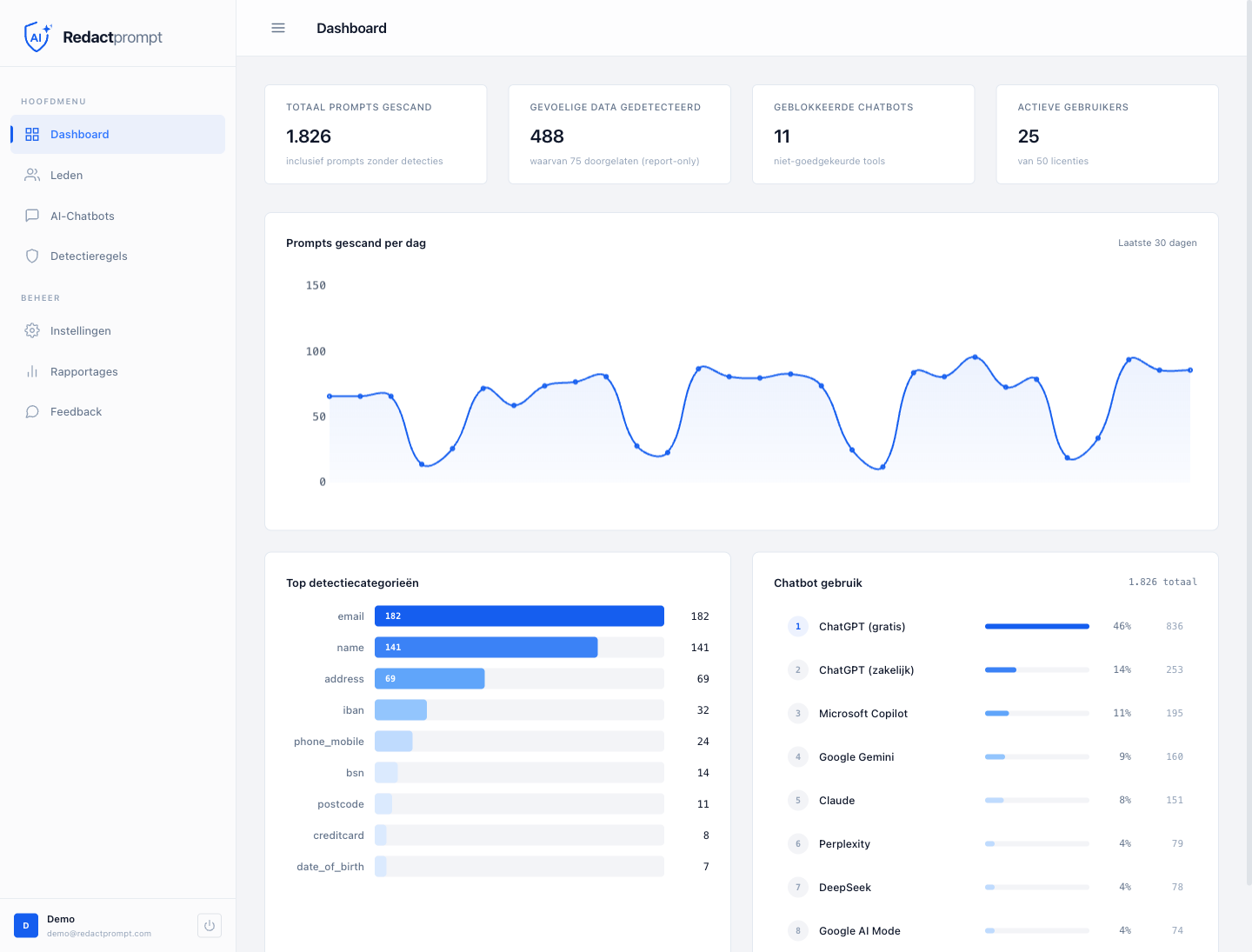
Over a month, nearly 1,900 prompts were scanned here, and about a quarter of them held sensitive data. Bottom left shows which kinds. Email addresses and names stand out, since they sit in almost every prompt. Below those come addresses, IBANs and phone numbers, with the occasional national ID number or credit card.
On the right you see which chatbots your team uses. ChatGPT is on top, and you can even tell whether people are on the free or the business version. That difference matters. The free ChatGPT trains on what you type into it by default, the business version doesn’t. If most of your team is on the free tier, you know right away where the conversation starts. Below that come Copilot, Gemini and Claude, and DeepSeek shows up at the bottom. Whether that’s a problem is your call. But you know it now, instead of after an incident.
That’s the difference from a survey or a network log. At most those tell you that AI is being used. The dashboard shows which sensitive data was stopped and on which tool, without a single prompt ever landing on the table.
From loose numbers to a grip
The reports page tells the same story in more detail, and also shows what happened to the detections.
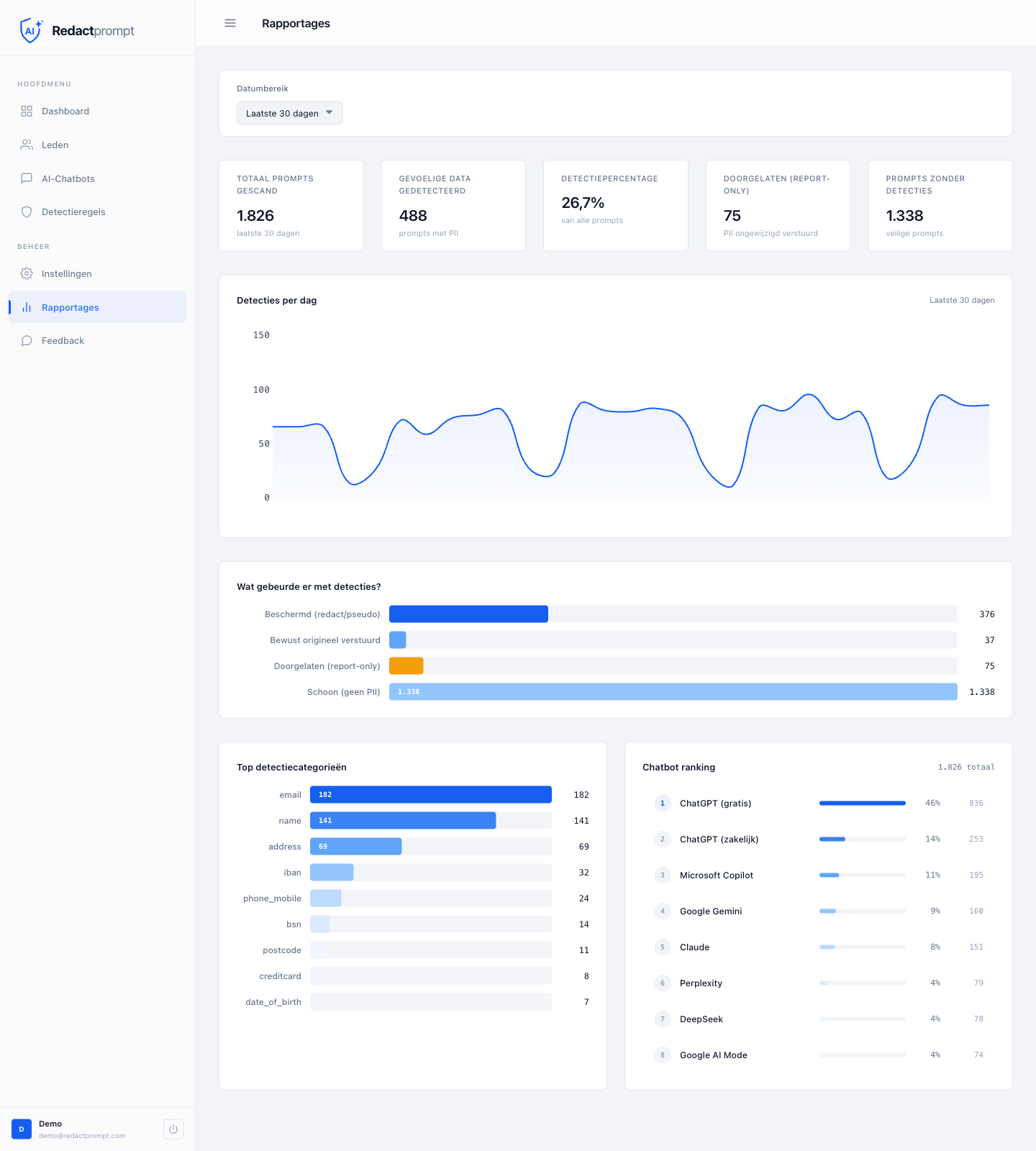
Most of the detections were protected. The sensitive data was redacted or swapped for a pseudonym before the prompt was sent. A smaller share passed through in report-only mode, so you can measure first without stepping in. These are the numbers you take into a conversation with your board or your DPO, instead of a gut feeling.
From visibility to policy
Seeing what happens is step one. Steering is step two. Based on what you see in the dashboard, you set per chatbot what’s allowed. Allow ChatGPT, block a risky tool, or always stop certain data types.
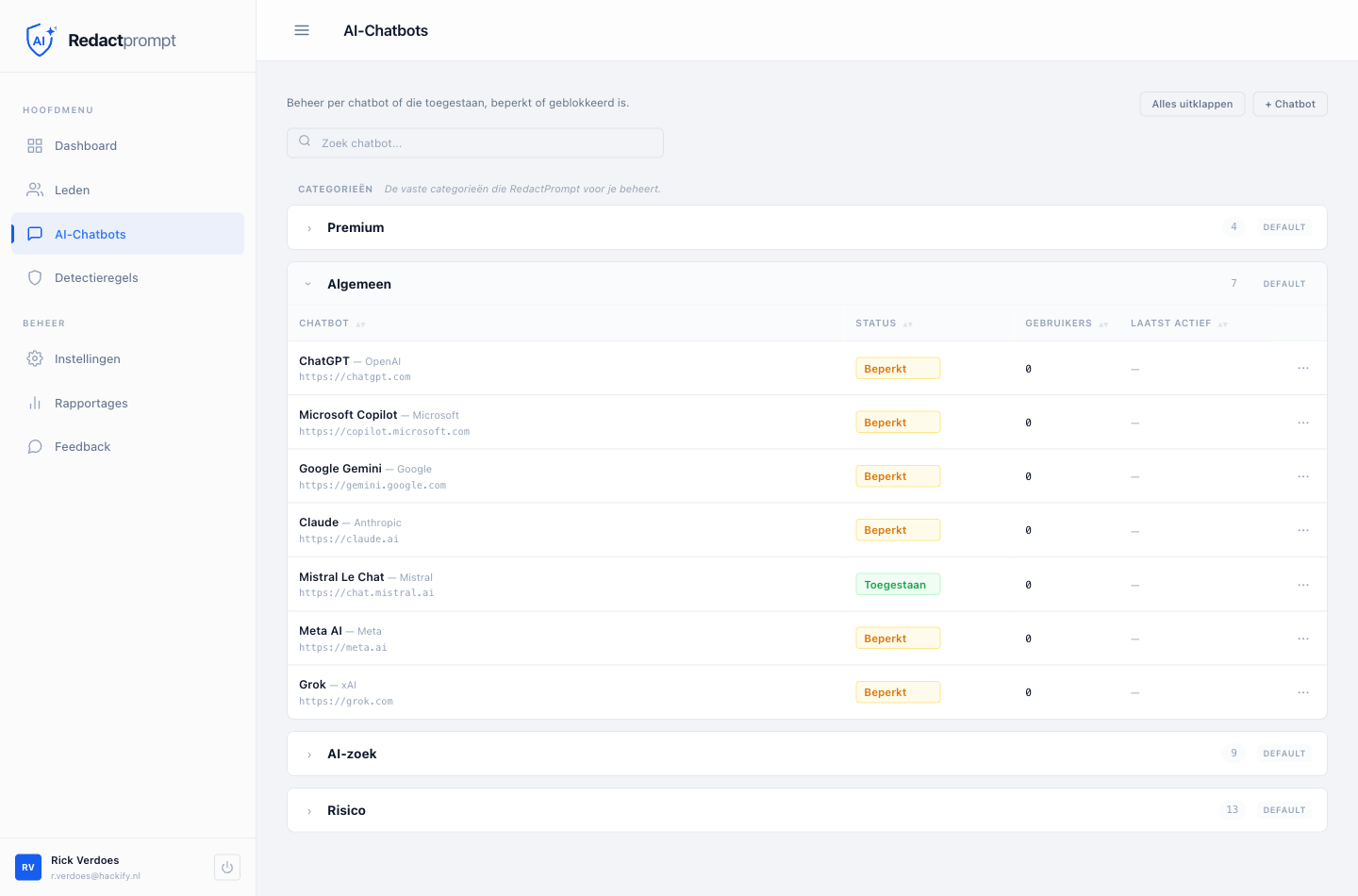
This is also where a flat ban falls apart. Block a tool outright and people reach for their phone or a private account, and you’ve lost the view again. Step in the moment someone pastes something sensitive, and the data stays safe while your team keeps working. There’s more on that in Blocking ChatGPT at work. And it’s no longer an optional choice. Since February 2025 the EU AI Act requires organizations to ensure AI literacy, and demonstrable visibility into your AI use is part of that.
How fast is this live?
For an individual user, within a minute. You install the extension in Chrome or Edge and detection runs right away, fully local.
Organization-wide you handle it over SSO or Intune. With SSO everyone signs in with their Microsoft account and falls under your organization automatically. With Intune you push the extension headless to your managed devices, with one org token and zero clicks for the employee. Literally one script, and in under four minutes it’s there.
No proxy, no network appliance, no DNS or firewall to rebuild. Where a classic DLP or proxy rollout is a project of weeks, you’re done in the time it takes to make a coffee. The defaults are safe out of the box. Every detector is on and sensitivity sits at a sensible level. If the configuration drops out for a moment, the extension fails closed rather than open.
Frequently asked questions
Can I see exactly what my colleagues type into ChatGPT?
Am I allowed to monitor employee AI use under the GDPR?
How is this different from network monitoring or a survey?
Which chatbots show up in the dashboard?
Want this picture for your own organization? You roll Redactprompt out in minutes, free to start, and watch your first numbers show up in the dashboard. Or get in touch to talk through a rollout for your team.
Prevent data leaks to AI chatbots
Redactprompt detects and protects sensitive data before it reaches an AI chatbot. Fully local in your browser.